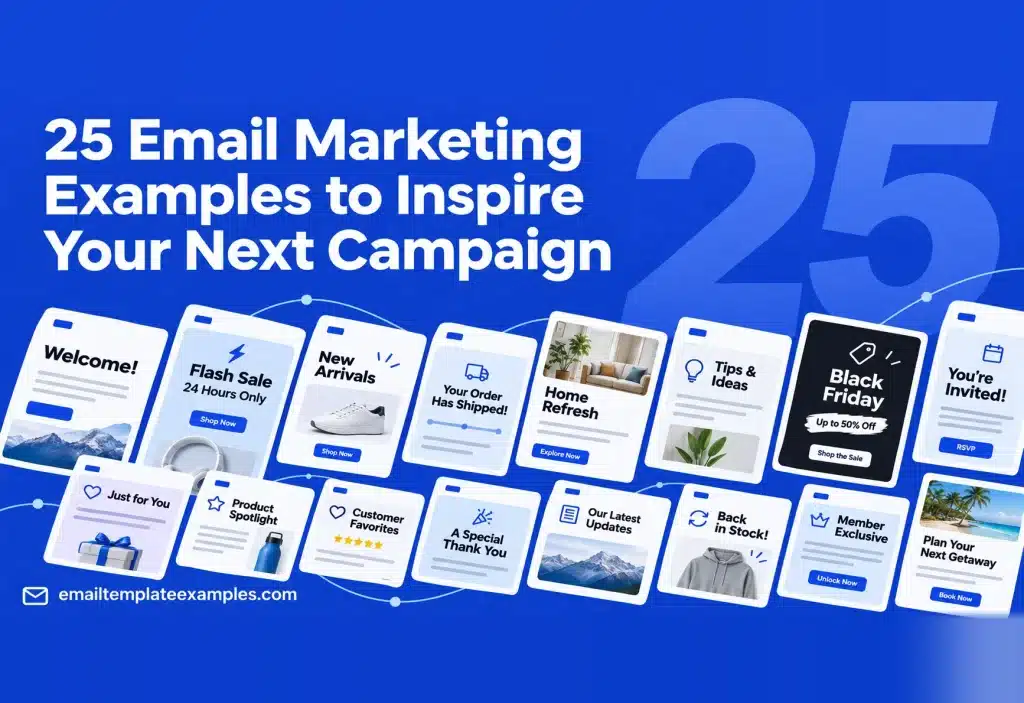
A marketing program is made of many small emails, each sent at a different moment in a customer’s life with your brand. This guide walks through 25 email marketing examples in that order, from the first hello to the note you send when someone goes quiet. For each email you get its goal, how it is put together, the call to action and a free HTML template that already follows that structure.
Nobody paid to be included here. We chose one template per job from our library of 258 designs, so each entry shows a different type of message. To learn how several emails connect into one plan, see our upcoming piece on email marketing campaign examples.
Want a wider pick of layouts? Our planned roundup of the best email templates sorts them by design style.
What counts as a marketing email?
Mailchimp’s email marketing definition describes it as sending email to market what a business sells and to build loyalty. Shopify’s email marketing guide splits store email into three groups: transactional, promotional and lifecycle. This list includes all three, because a receipt or a shipping notice is also a chance to keep a customer.
Many of these emails are sent automatically. Klaviyo’s help article on flows describes a flow as a sequence of automated messages triggered by a behavior or event, such as joining a list, starting checkout or an upcoming birthday. If you want examples from named brands, Klaviyo’s collection of B2C email examples is a good place to look.
At a glance
| # | Stage | Template | |
|---|---|---|---|
| 1 | First welcome | Sign-up | Coffee Shop Welcome |
| 2 | Founder letter | Sign-up | Founder Note Day Three |
| 3 | Confirm subscription | Sign-up | Double Opt-In Confirmation |
| 4 | Setup steps | Onboarding | SaaS Onboarding Checklist |
| 5 | Weekly reading letter | Engagement | Editorial Brief Newsletter |
| 6 | Event invite | Engagement | Art Gallery Opening |
| 7 | Webinar invite | Engagement | SaaS Live Webinar Invite |
| 8 | Webinar replay | Engagement | Webinar Replay Follow-Up |
| 9 | Flash sale | Promotion | Flash Sale Weekend |
| 10 | New product | Promotion | Coffee New Blend Launch |
| 11 | Feature update | Promotion | SaaS Feature Announcement |
| 12 | Holiday deadline | Promotion | Christmas Last Order Dates |
| 13 | Cart reminder | Purchase | Cart Reminder With Free Shipping Nudge |
| 14 | Browse reminder | Purchase | Browse Left Behind Grid |
| 15 | Size restock | Purchase | Your Size Is Back |
| 16 | Order confirmation | Post-purchase | Order Confirmed Receipt |
| 17 | Shipping notice | Post-purchase | Order Shipped Tracking |
| 18 | First order thanks | Post-purchase | First Order Thank You |
| 19 | Review request | Post-purchase | Product Review Request |
| 20 | Score survey | Feedback | NPS Score Survey |
| 21 | Points balance | Loyalty | Loyalty Points Statement |
| 22 | Referral | Loyalty | Garden Referral Gift |
| 23 | Birthday reward | Loyalty | Fashion Birthday Reward |
| 24 | Win-back offer | Re-engagement | Winback 25% Off |
| 25 | List check | Re-engagement | Stay Subscribed Reconfirm |
Sign-up and onboarding emails
1. The first welcome email
The welcome email lands while interest is at its highest, so it should give the new subscriber something useful right away.
Goal: turn a sign-up into a first visit or first order.
Structure: the brand name set large up top, a single cafe image, three bestselling coffees with what they cost, and a code worth 10% off the first purchase.
CTA: shop the bestsellers with the code.
Template: Coffee Shop Welcome. For more first-touch layouts, see our upcoming welcome email examples.
2. The founder letter
A few days after sign-up, a short personal letter can explain why the brand exists in a way a sales email cannot.
Goal: build trust before asking for anything big.
Structure: a short note written as if from the person who started the business, with a small photo of where things get made, a sign-off and a soft button. It is built to go out on day three of a welcome series.
CTA: a low-key link to the shop or the brand story.
Template: Founder Note Day Three
3. The subscription confirmation
A double opt-in email asks new subscribers to confirm their address before they get regular mail.
Goal: make sure the address is real and the person wants your emails.
Structure: a drawing of fresh produce, a single button to confirm, and a quick preview of the topics the newsletter covers.
CTA: confirm the subscription.
Template: Double Opt-In Confirmation
4. The setup checklist
For software and apps, the first emails should get people to the moment the product becomes useful.
Goal: get a new user through the first steps.
Structure: a friendly hello, one primary button and three steps in order, each with its own link, followed by a panel where readers can find help.
CTA: open the app and finish step one.
Template: SaaS Onboarding Checklist
Content and engagement emails
5. The weekly reading letter
A newsletter keeps you in the inbox between sales by sending something worth reading.
Goal: a steady habit of opens and clicks.
Structure: soft paper colors, the title of the main essay, three picks to read with numbers beside them, one recommended tool, a note from the editor and a button to forward it.
CTA: read the picks, then share the letter.
Template: Editorial Brief Newsletter
6. The event invitation
An invite works when the reader can see the date, place and reason to come without hunting.
Goal: RSVPs for an in-person event.
Structure: the exhibition name set large over a photo of the space, the date and time of the opening in its own card, a few lines about the artist and the late opening hours.
CTA: RSVP or add the date to a calendar.
Template: Art Gallery Opening
7. The webinar invitation
Online events need the time zone spelled out and one obvious place to register.
Goal: registrations for a live session.
Structure: a laptop image beside the headline on a deep blue panel, the date and time in its own card, three session topics with images and a registration button.
CTA: save a seat.
Template: SaaS Live Webinar Invite
8. The webinar replay
Many people who register never attend live. A replay email gives them a second chance and gives attendees a recap.
Goal: views of the recording and a next step.
Structure: a video still that links to the recording, four lessons from the session, links to the slide deck and a call booking page, and a button for a short survey.
CTA: watch the replay.
Template: Webinar Replay Follow-Up
Promotional emails
9. The flash sale
A short sale needs the discount, the products and the deadline in the first screen.
Goal: revenue inside a fixed window.
Structure: a bright band with the offer in capitals, one product photo in a frame, three products with the before and after price, and the weekend code in a box.
CTA: shop the sale before it ends.
Template: Flash Sale Weekend. Our list of promotional email examples has 19 more sale layouts.
10. The new product launch
A launch email should explain what is new and why the reader might care, then show the price.
Goal: first orders of a new product.
Structure: a strong orange header with the new coffee pictured, the introductory price, the flavor profile shown as icons and three ways to brew it, each priced.
CTA: try the new blend.
Template: Coffee New Blend Launch
11. The feature announcement
Software customers want to know what changed and how it helps them, in a few lines.
Goal: adoption of new features.
Structure: purple and green brand colors, a drawing of the product’s builder, four updates set out as icons across two rows, and one button.
CTA: try the new features now.
Template: SaaS Feature Announcement
12. The holiday shipping deadline
Before a gift holiday, the most useful thing a store can send is the date by which people must order.
Goal: orders before the cutoff, and fewer late delivery complaints.
Structure: no imagery at all, a green header, a cutoff date for every shipping option, a modest code and a single button.
CTA: order in time.
Template: Christmas Last Order Dates
Purchase and recovery emails
13. The cart reminder
When a shopper leaves items in a cart, a reminder can answer the question that made them stop.
Goal: a completed checkout.
Structure: the shoes still in the cart with their prices, how much more the shopper needs to spend for free delivery, a button back to checkout and three matching extras.
CTA: return to the cart.
Template: Cart Reminder With Free Shipping Nudge
14. The browse reminder
Browse emails go to people who looked at products but never added them to a cart, so they should feel lighter than a cart email.
Goal: a second visit to the product pages.
Structure: no header image. A headline sits left, followed by three portrait photos of the viewed products, each labeled with its name and price.
CTA: take another look.
Template: Browse Left Behind Grid
15. The size restock alert
People who asked to hear about a restock already want the product, so the email only needs to say it is back.
Goal: fast orders on returning stock.
Structure: a split opening with a photo on one side and a dark block on the other, one button per restocked size, and brief notes on delivery and returns.
CTA: tap your size.
Template: Your Size Is Back
Post-purchase emails
16. The order confirmation
Shopify’s guide notes that receipts should answer the basics first: when the order will arrive, where it is going and where to ask questions.
Goal: reassurance right after payment.
Structure: each item pictured, the subtotal, delivery cost, tax and order total, where it ships and how it was paid, and a button to follow the order.
CTA: track the order.
Template: Order Confirmed Receipt
17. The shipping notice
A shipping email is opened by someone who is already waiting for a parcel.
Goal: fewer “where is my order” questions.
Structure: a drawing of a box, the tracking code set apart so it is easy to copy, a list of what was sent and a tracking button.
CTA: track the parcel.
Template: Order Shipped Tracking
18. The first order thank you
A thank you after the first purchase can turn a one-time buyer into a repeat one.
Goal: a second order and a good first experience.
Structure: a quiet photo of a plant in a bedroom, a brief signed note, first-week care advice shown as icons and a discount for a repeat order.
CTA: use the code on the next order.
Template: First Order Thank You
19. The review request
Ask once the customer has had time to use the product, and make the answer one tap.
Goal: product reviews.
Structure: a photo of flower petals, a row of five rating buttons that each count as an answer, a line about how the reviews will be used and a few small rose drawings.
CTA: tap a rating.
Template: Product Review Request
20. The score survey
A one-question survey is easy to answer straight from the inbox.
Goal: a Net Promoter Score and a sense of how customers feel.
Structure: styled like a plain letter, with a single question, eleven clickable scores from 0 to 10, a line on what you will do with the answers and a sign-off.
CTA: click a score.
Template: NPS Score Survey
Loyalty and re-engagement emails
21. The points statement
A points email reminds members what they have already earned and what is close.
Goal: another visit to reach the next reward.
Structure: the member’s current balance and how far they are from the next reward in a dark header, then three easy ways to collect more.
CTA: earn more points.
Template: Loyalty Points Statement
22. The referral invite
Referral emails work when both gifts are clear and the code is easy to share.
Goal: new customers through existing ones.
Structure: a full-width row of photos, two side-by-side cards explaining what the friend gets and what the sender gets, and a single code to pass on.
CTA: share the code.
Template: Garden Referral Gift
23. The birthday reward
A birthday email is one of the few promotions that feels personal by default.
Goal: a visit or order during the birthday window.
Structure: a pink header with a gift photo, a 25% code for the birthday and three outfit ideas.
CTA: use the birthday code.
Template: Fashion Birthday Reward
24. The win-back offer
When a customer has not bought in months, a clear offer may be what brings them back.
Goal: a returning customer.
Structure: an orange header, the 25% offer in very large type, a code inside a dashed border, three short notes on what is new and an easy option to leave the list.
CTA: come back with the code.
Template: Winback 25% Off
25. The list check
Sometimes the honest move is to ask whether a subscriber still wants your email at all.
Goal: a cleaner list of people who want to hear from you.
Structure: a bold wordmark, a calm question, a solid yes button and an outline no button, signed by the team.
CTA: stay subscribed, or leave.
Template: Stay Subscribed Reconfirm. See all Re-engagement templates for more win-back layouts.
What these email marketing examples have in common
Look across the 25 emails and a few patterns repeat:
- One main action. Many of these templates have one button, or one type of button repeated per product. Readers know what to do next.
- The key fact comes early. The code, the date, the points balance or the tracking number sits near the top.
- A reason tied to the reader. Each email answers something the person did or cares about: a sign-up, a cart, an order, a birthday or a long silence.
- Light files. Each template page lists its file size against the 102 KB point where Gmail clips long messages.
How to measure a single email
Clicks and replies are usually a more dependable signal than opens. Apple’s Mail user guide says that with Mail Privacy Protection on, the reader’s IP address is hidden and remote content is loaded privately in the background. The open-rate caveat comes from Mailchimp’s email marketing benchmarks page, which notes that MPP may affect how accurate open rates are, so read open data with care.
FAQ
What are the main types of marketing emails?
Shopify groups store emails into transactional, promotional and lifecycle messages. In practice that covers welcome, newsletter, sale, cart, order, review, loyalty and win-back emails like the ones above.
Which email should I set up first?
For most stores, the welcome email and the cart reminder are sensible first steps, because they are sent to people who have just shown interest.
Can I use these templates with my email platform?
Yes. Copy the HTML from any template page and paste it into your platform’s custom code option. You can preview and copy without an account. The editor and file exports need a free account.
Are these examples from real brands?
No. They are free templates from our library, written with sample brands and products. For campaigns from named companies, see the Klaviyo collection linked above.
Wrapping up
Every stage of the customer journey has an email that fits it, from the first welcome to the final list check. Pick the two or three that match where your customers drop off, set them up with a template that already has the right structure, and measure them by clicks and orders.
You can browse all 258 designs in the free email template library.